Gallery Wall Planner for Desktop & Mobile
Plan endlessly. Drill once.
Shuffle frames. Test spacing. Hang your wall with confidence.
Free to start · No account needed · Photos never uploaded to our servers

User satisfaction: 89% positive (833 responses)
From empty wall to hanging day.
Everything you need to make the decisions on screen before you make holes in the wall.
Set up your wall
Start with Guided Setup or enter your wall dimensions yourself. Add the frames you own, retailer sizes, and Wall Objects such as windows, doors, or fireplaces.
Find the arrangement
Try Starter Layouts, arrange frames by hand, or generate options with Auto-Layout. Add photos and let Smart Fill help match the right images to each frame.
Take it to the wall
Fine-tune crops and spacing, then use the on-screen measurements or export a drill-ready Hanging Guide when it is time to install.
A digital scratchpad for your gallery wall.
Stop taping things to the wall. Plan it out here.
Real Inventory
Plan with the frames you actually own.
Add your frames and the Wall Objects around them, like windows, doors, and fireplaces. Mix standard sizes, custom dimensions, and real retailer frames with their mats built in.
Read the frame size guideStarter Layouts
Start from a layout that already works.
Looking for gallery wall layout ideas? Browse 110+ Starter Layouts, many drawn from real gallery walls, each built with real frame sizes like 5×7, 8×10, and 11×14 so you know exactly what to buy. Apply one in a click, fill the frames with your own photos and art, then resize or rearrange anything. Essentials, Organic, Architectural, and Salon are free; Pro adds Curated Finds, The Townhouse Collection, and Editorial Mix.
Explore Example LayoutsPopular layouts with frame sizes: Over a sofa · Grid · Small wall · Staircase · Salon style · 3 frames
Curate Your Collection
See your photos on the wall before you print.
Drag your photos onto frames and fine-tune each crop until it looks right. With Pro, crop by dragging the photo right in its frame, brighten dull photos in one click, try any photo in black and white, and download every photo cropped to its frame, ready to print. Your photos are never uploaded to our servers.
Read about local-first privacySmart Fill
Let your photos find their frames.
Let AI analyze your photo library for composition, color, and resolution, then auto-place the best matches into your frames. Runs entirely on your device — no cloud, no uploads.
Read the Smart Fill guideAuto-Layout
Get balanced arrangements in seconds.
Stuck on what goes where? Choose from six layout styles and generate balanced arrangements in seconds. Need more control? Fence off part of the wall, center the group at eye level, or pin your favorite layouts to compare.
Read the Auto-Layout guideStyle Your Wall
See it on your own wall.
Set the mood with the right backdrop. Choose from wall textures or use a photo of your own wall as the canvas backdrop. Add multiple walls to one project for a hallway, staircase, or whole room, then keep the plan together as you work.
Learn about Wall TexturesPlan anywhere, anytime.
The full planner, built for your phone.
Touch-Optimized
A native interface designed for your thumbs. Drag frames and photos from your library, pinch to zoom, and tap to select. Every major desktop feature works on your phone too, including Auto-Layout, Smart Fill, Starter Layouts, and the Hanging Guide.
Move Between Devices
Pick up where you left off on the same device, or move a project between devices with a portable .gwall export. Your work stays on your device by default.
Pocket Reference
Need to check if an 11×14 fits? Pull up your layout instantly at the store.

Try it on your phone. Point your phone's camera here to open GalleryPlanner.

What people are saying.
Feedback from people planning real walls.
Great for moving into a new house and planning/visualizing picture placement.
So far this is way better interface than what I have used before. Will purchase lifetime soon.
Thank you for not locking basic features behind a paywall. It makes me actually like your service and WANT to pay for extra features.
Choose the Pro plan that fits your project.
Start with a Pro Pass (from $6) or get Lifetime Pro ($99).


Purchases are subject to our Terms, Refund Policy, and Privacy Policy.
GalleryPlanner FAQs
Quick answers about planning workflows, privacy, and exports.
What is GalleryPlanner?
GalleryPlanner is a gallery wall planner that helps you build layouts with real frame sizes, test spacing, and export install-ready outputs like hanging guides and shopping lists (some features require Pro). It runs right in your browser, with nothing to install, and an iPhone app is coming soon.
Do you have gallery wall layout ideas?
Yes. Browse 110+ Starter Layouts, from simple trios and grids to salon-style and staircase walls, each built with real frame sizes like 5×7, 8×10, and 11×14. Apply one to your wall, fill the frames with your own photos and art, and adjust anything until it fits your space.
Is GalleryPlanner free to use?
Yes. Core planning is free forever, including Auto-Layout and Smart Fill. Pro unlocks additional features for serious planners like premium exports, multi-wall projects (plan several walls in one project), and multi-project editing.
Do my photos get uploaded to your servers?
No. GalleryPlanner is local-first: your photos and projects stay on your device and are processed right there, in your browser or the iPhone app. They’re never uploaded to our servers; upgrading to Pro doesn't change that. For a backup, use Export Project to save a .gwall file.
Can I plan with frames from a specific store or brand?
Yes. Pick actual frame sizes from IKEA, Pottery Barn, West Elm, and CB2 with the mats built in, so your plan matches what you buy. IKEA is free; other brands are part of Pro.
Can I print measurements for install day?
Yes. You can export a drill-ready hanging guide with placement and spacing measurements to use during installation, so you can mark and hang with confidence. Hanging guide export is a Pro feature.
Master the Art of Gallery Walls
Expert guides and design tips to help you plan your space.

The Best Gallery Wall Planners: An Honest Comparison (2026)
See how GalleryPlanner stacks up against Mixtiles, Framebridge, ArtPlacer, WALLARY, and other planners before you choose.
Compare Planners
The Complete Guide to Gallery Walls
Everything you need to know about designing, planning, and hanging a gallery wall.
Read Guide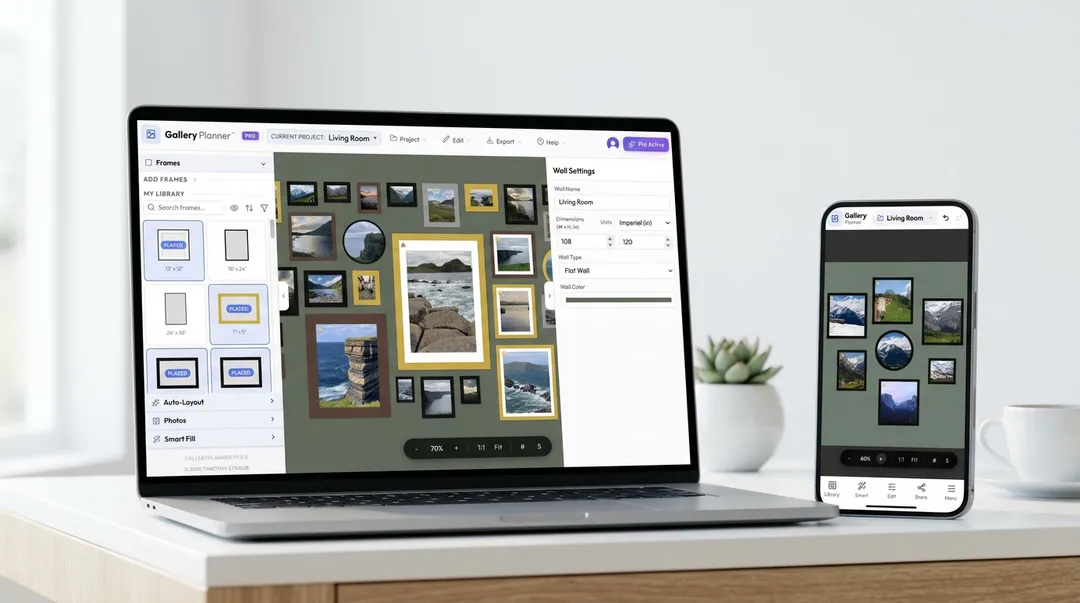
GalleryPlanner™: Complete User Guide
Master our tool with this comprehensive walkthrough of features and best practices.
Read Guide