The Complete Guide to Gallery Walls
The complete guide to planning, spacing, and installing a cohesive gallery wall, with layout ideas, sizing rules, hanging tips, and room-by-room guidance from first concept to install day.
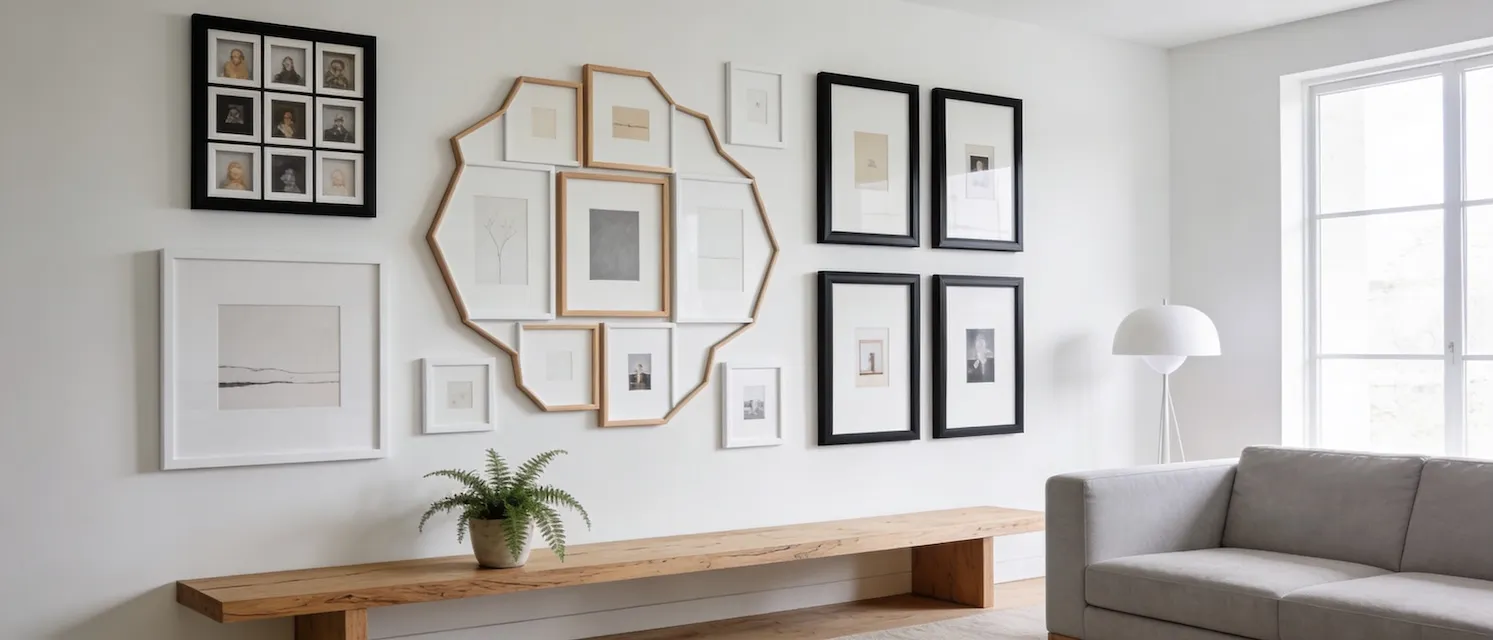
A gallery wall is a curated arrangement of framed art, photos, or objects that turns one wall into a single composition. To make it look intentional instead of crowded, you need to plan scale, spacing, and visual balance before you start hanging.
What is a Gallery Wall?
A gallery wall is a curated collection of framed artwork, photographs, or decorative objects arranged together on a single wall. Unlike a single statement piece, a gallery wall creates visual interest through the interplay of multiple frames, sizes, and compositions.
Gallery walls can range from highly structured grid layouts to organic, salon-style arrangements. The key is intentionality—every frame should have a purpose and contribute to the overall aesthetic.
Popular Gallery Wall Styles
| Style | What It Is | Best For | Pro Tip |
|---|---|---|---|
| Grid | Frames in perfect rows/columns with consistent spacing | Modern, minimalist spaces; uniform frame sizes | Works best with identical sizes (e.g., all 8×10). Keep 2-3” spacing uniform. |
| Salon-Style | Dense, eclectic arrangement from floor to ceiling | Traditional/maximalist interiors; diverse collections | Start with largest piece, build outward. Keep 2-3” spacing even with varied sizes. |
| Symmetrical | Left/right sides mirror each other around a central axis | Formal spaces (dining rooms, entryways) | Use a centerline as anchor—a large piece in middle or imaginary dividing line. |
| Asymmetrical | Organic balance without perfect symmetry | Contemporary spaces; dynamic compositions | Aim for “visual weight” balance—large dark frame = several small light frames. |
Design Principles for Gallery Walls
1. Balance and Proportion
Balance doesn’t mean symmetry—it means distributing visual weight evenly across your composition.
- Heavy vs. Light: Large frames or dark colors carry more visual weight than small or light-colored frames
- The Rule of Thirds: Divide your wall into thirds (horizontally and vertically) and place focal points at the intersections
- Negative Space: Don’t overcrowd. White space around and between frames is just as important as the frames themselves
2. Color Theory
The colors in your frames and artwork should work together harmoniously.
- Monochromatic: All frames in one color (e.g., all black, all gold) creates cohesion
- Complementary: Mixing warm and cool tones (e.g., black and natural wood) adds interest
- Artwork Palette: Consider the colors within the artwork, not just the frames—they should complement your room’s color scheme
3. Focal Points
Every gallery wall needs an anchor—a piece that draws the eye first.
- Size: The largest frame often serves as the focal point
- Placement: Typically placed at or slightly above eye level (57-60 inches from floor to center)
- Color or Subject: A brightly colored piece or compelling subject matter can also serve as a focal point
4. Rhythm and Flow
Create movement across your gallery wall by:
- Repeating frame styles or sizes at intervals
- Using a consistent spacing pattern
- Arranging frames to guide the eye across the wall (e.g., stepping down a staircase)
Common Gallery Wall Mistakes to Avoid
| ❌ Mistake | The Problem | ✅ The Fix |
|---|---|---|
| Hanging too high | Treating gallery walls like single-frame hanging | Center at eye level (57-60” from floor); bottom frames should sit lower than you might think |
| Inconsistent spacing | Random gaps make it feel chaotic | Pick 2-3” spacing and stick to it everywhere |
| Buying frames first | Accumulating random frames that don’t work together | Plan your layout with GalleryPlanner first, then buy frames |
| Ignoring wall features | Treating wall like blank canvas | Work with windows, doors, switches—use them as natural boundaries |
| Too many frame styles | Every frame different = visual chaos | Limit to 2-3 frame styles max (e.g., black + natural wood) |
Room-Specific Gallery Wall Ideas
| Room | Best Placement | Recommended Styles | Size Guidance |
|---|---|---|---|
| Living Room | Above sofa, large wall, or flanking fireplace | Salon (maximalist) or Grid (modern) | 2/3 to 3/4 the width of your sofa |
| Hallway | Long wall as you walk down | Horizontal grid or linear arrangement | Keep at eye level with consistent spacing |
| Staircase | Diagonal wall alongside stairs | Asymmetrical following the stair angle | Use GalleryPlanner’s staircase mode |
| Bedroom | Above headboard or feature wall | Symmetrical (calming) or themed (personal) | Centered above bed, narrower than bed width |
| Home Office | Behind desk (Zoom background!) or side wall | Grid (professional) or inspiration boards | Keep neutral and organized—not distracting |
Planning Your Gallery Wall with GalleryPlanner
The biggest challenge with gallery walls? Visualization. Laying frames out on the floor doesn’t account for vertical space, and eyeballing measurements leads to misplaced nail holes.
That’s where GalleryPlanner comes in.
Why Use a Digital Planner?
- Exact measurements: Know precisely where every nail goes before you pick up a hammer
- Experiment risk-free: Try dozens of layouts without commitment
- Use your real frames: Input your actual frame inventory—no more guessing if that 11×14 will fit
- Export hanging guides (Pro Only): Get a PDF with measurements to help you hang frames right the first time
Step-by-Step: Creating Your First Gallery Wall
1. Choose Your Wall
Pick a wall that:
- Gets good natural light (if displaying art)
- Is visible from main living areas
- Has enough space for multiple frames (at least 4-6 feet wide)
- Doesn’t have too many obstacles (switches, vents, etc.)
2. Gather Your Frames
Start with what you have, or plan your purchases strategically:
- Measure every frame (width × height)
- Note frame colors and styles
- Decide what will go inside each frame (photos, art, or leave empty mats)
3. Plan Your Layout
Use GalleryPlanner to:
- Input your wall dimensions
- Add your frame inventory
- Experiment with different arrangements
- Use Auto-Layout to get suggestions
4. Export Your Hanging Guide
Once you’re happy with your design:
- Export a PDF hanging guide with measurements (Pro Only)
- Print it out for reference while hanging
- Have a friend or partner help you measure and mark
5. Hang with Confidence
Follow your plan:
- Mark nail positions with a pencil using your exported guide
- Use a level to ensure frames are straight
- Start from the center and work outward
- Step back frequently to check your progress
Advanced Tips for Gallery Wall Pros
Tip 1: Create a Template Wall
For complex layouts, tape paper templates (cut to frame size) on your wall before committing to nail holes. This lets you see the arrangement in situ and make final adjustments.
Tip 2: Use Different Hanging Methods
Not all frames need to be hung the same way:
- Picture hooks: Best for lightweight frames
- D-rings + wire: Professional and adjustable
- Command strips: Damage-free for renters
Tip 3: Light Your Gallery Wall
Good lighting makes a huge difference:
- Install picture lights above key pieces
- Use adjustable spotlights to highlight the wall
- Avoid direct sunlight to prevent fading
Tip 4: Rotate Your Collection
Gallery walls don’t have to be permanent:
- Swap out seasonal photos (holiday cards, summer vacation pics)
- Rotate kids’ artwork as they create new pieces
- Update your collection as your style evolves
Conclusion: Your Gallery Wall Journey Starts Here
Gallery walls are more than just decoration—they’re a reflection of your life, your tastes, and your story. Whether you’re creating a clean grid of family photos or an eclectic salon wall of vintage finds, the key is planning and intentionality.
Ready to visualize your perfect gallery wall? Try GalleryPlanner for free and see your ideas come to life before you hammer a single nail.
Ready to Keep Planning?
Open GalleryPlanner and jump back into your current wall plan without forcing you into a specific tool first.
Launch GalleryPlanner