The Vintage Vibe: Design with Upcycled & Thrifted Frames
Learn how to mix thrifted, vintage, and upcycled frames into a gallery wall that feels curated, cohesive, and intentionally collected over time instead of randomly mismatched.
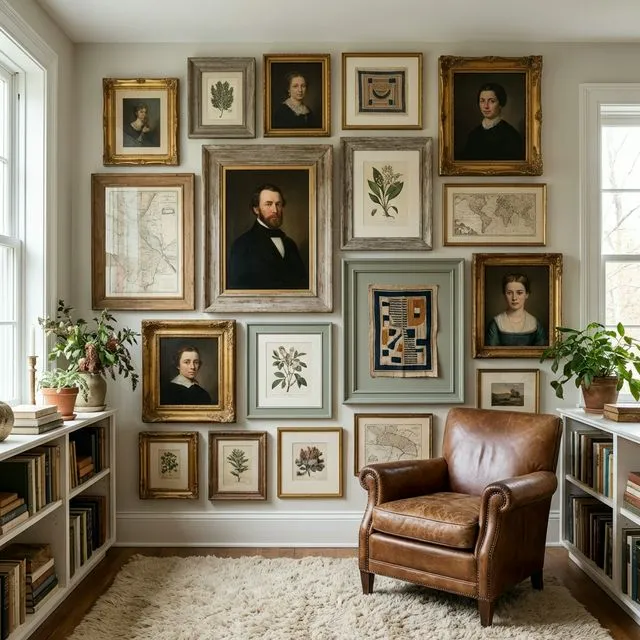
A vintage-frame gallery wall works when you give the collection one common thread, then let the mismatched sizes and shapes supply the character. Custom dimensions matter because found frames rarely follow standard sizes.
Why We Love Upcycled Frames
Upcycling isn’t just about sustainability—though that’s a huge plus. It’s about:
- Unique Textures: From ornate gilded plaster to weathered barn wood.
- Eclectic Shapes: Oval, hexagonal, or deep shadow boxes that break the “grid” mold.
- Narrative: Every frame has a story, even if you’re the one starting its next chapter.
The Cohesion Strategy: Making Mismatched Look Intentional
The line between “vintage chic” and “garage sale clutter” is thin. Here is how to stay on the right side of it:
1. The Common Thread
Pick one element to keep consistent across your eclectic collection.
- Color Palette: Paint all your thrifted frames the same color (matte black or soft white are classics).
- Matting: Use identical mat colors and textures (e.g., all cream linen) to tie different styles together.
- Content: Fill variety-filled frames with a unified photo style, like all black and white photography.
2. Embrace the “Salon” Layout
Symmetrical grids are nearly impossible with vintage frames. Instead, opt for a Salon Wall or Asymmetrical layout. This style celebrates variance, making the different heights and widths feel like a design choice rather than a mistake.
Precision Planning: The GalleryPlanner Advantage
The biggest hurdle with vintage frames is the math. When you have a 9.5” × 11.25” frame you found at a flea market, traditional “standard size” advice goes out the window.
Custom Dimensions are the Plus
GalleryPlanner was built for this. Unlike apps that limit you to 8×10 or 11×14, we allow you to input the exact outer dimensions of your frame.
- Measure Twice: Use a physical ruler to measure the outer width and height of your thrifted frames.
- Input Exactly: Add a new frame in GalleryPlanner and type in those exact measurements.
- Visualize the Gap: See exactly how that ornate 13-inch frame sits next to a modern 5×7.
💡 Tip: If you have 20 unique frames, add them all to your Library first. Then use the Auto-Layout generator. It will treat your custom dimensions as constraints and find the most balanced way to “puzzle” them together.
Pro Tip: Painting & Prepping
If you find a frame with “good bones” but a “bad finish,” don’t pass it up!
- The “Gold Leaf” Fix: A little bit of Rub ‘n Buff can turn a plastic-looking frame into a convincing antique.
- Removing “The Funk”: Vintage frames often come with old backing or glass. Clean them thoroughly with a 50/50 vinegar-water mix to remove years of dust without damaging delicate finishes.
- D-Rings vs. Wire: Vintage frames often have flimsy hangers. We recommend replacing them with heavy-duty D-rings so your frames stay level on the wall.
Case Study: The “Wall of Many Sizes”
Imagine a staircase wall featuring 14 frames, no two of which are the same size. By using a consistent 2-inch spacing and matching white mats, the chaos is transformed into a sophisticated, curated collection.
Start planning your vintage gallery wall →
Ready to Keep Planning?
Open GalleryPlanner and jump back into your current wall plan without forcing you into a specific tool first.
Launch GalleryPlanner