Frame TV Gallery Wall Design Guide
Design a gallery wall around a Frame TV or standard television so the screen feels integrated with the art instead of interrupting the composition or dominating the wall.
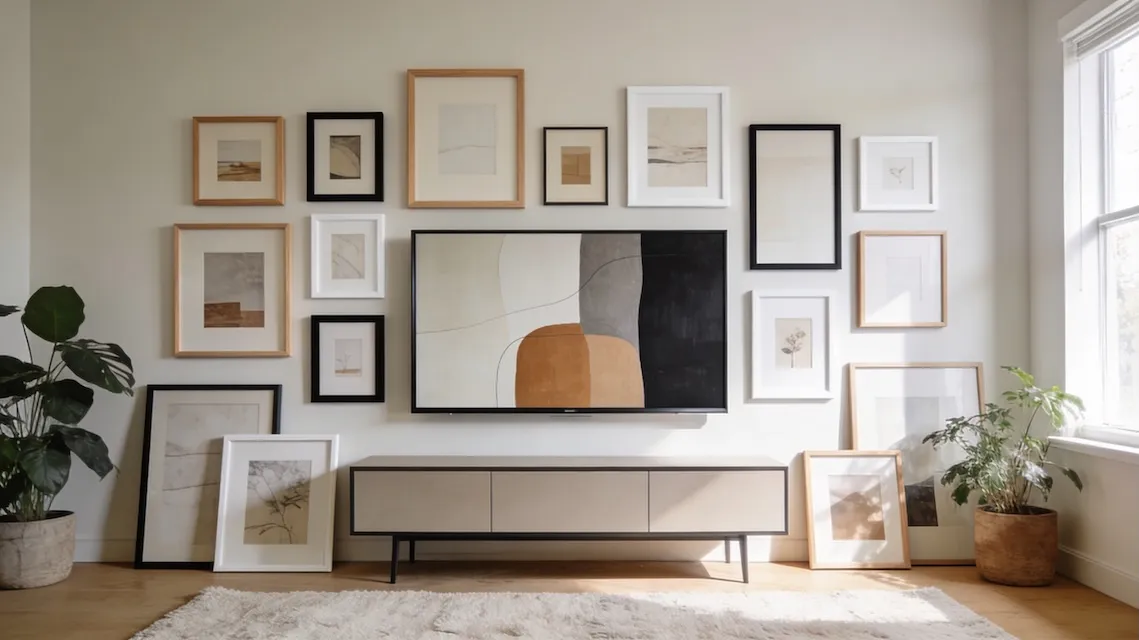
The best Frame TV gallery wall makes the screen feel like one element in a larger composition, not a black rectangle floating by itself. That means using the TV’s scale, fixed position, and surrounding frames as part of the design from the start.
The TV Challenge
Let’s be honest about what makes TV integration tricky. TVs dominate by size—even a modest 55-inch is often the largest “frame” on your wall. Unless you have Art Mode, that screen is a dark void when off. And once mounted, it’s not moving.
| Issue | Why It’s Tricky |
|---|---|
| Size dominates | TVs are often the largest element on the wall |
| Black rectangle | When off, disrupts visual flow |
| Fixed position | Gallery must work around the TV |
| Tech visible | Cables and hardware break the illusion |
Layout Options
| Layout | Description | Best For |
|---|---|---|
| Full Surround | Frames on all 4 sides | Salon-style rooms |
| L-Shape | Frames on 2 adjacent sides | Asymmetric look |
| Triptych | 3 frames beside/above TV | Minimalist spaces |
| Below Only | Art below TV | Practical, clean |
Full Surround is the most dramatic option, essentially embedding the TV in a dense gallery. L-Shape creates an asymmetric look that feels intentional without overwhelming the wall. Below Only is the most practical—it doesn’t interfere with screen visibility and grounds the TV in the furniture arrangement.
Size Relationships
The key to successful TV integration is making the surrounding frames substantial enough to matter. Tiny 4×6 frames around a 65-inch TV look like insects buzzing around a giant.
| TV Size | Total Gallery Width |
|---|---|
| 55” | 65-80” total |
| 65” | 75-100” total |
| 75”+ | Full feature wall |
Rule of thumb: The entire gallery should span about 2/3 the width of your media console.
Frame Sizing Around TVs
| Position | Recommended Sizes | Why |
|---|---|---|
| Above TV | Small to medium (8×10 to 11×14) | Doesn’t compete |
| Below TV | Medium (11×14 to 16×20) | Grounds the TV |
| Beside TV | Varied (5×7 to 16×20) | Creates interest |
Use medium to large frames (11×14” and up) for anything directly adjacent to the TV.
Samsung Frame Tips
If you have a Samsung Frame TV (or similar), Art Mode displays artwork when you’re not watching, solving the black rectangle problem.
| Feature | How to Use It |
|---|---|
| Art Mode | Display art when TV is off |
| Matte finish | Reduces glare, looks like canvas |
| Customizable bezel | Match your other frame colors |
| Personal photos | Upload your own images |
Even with Art Mode, the gallery wall strategies still apply—you want the TV to feel like one of many frames, not the centerpiece that happens to have company.
Spacing Guidelines
Give the TV slightly more breathing room than typical frame-to-frame spacing.
| Element | Spacing |
|---|---|
| Frame-to-TV | 3-4” (extra clearance) |
| Frame-to-frame | 2-3” (standard) |
| Gallery edges | 4-8” to wall/furniture |
The “TV Off” Test
Before finalizing your layout, ask: does this gallery look good when the TV is off? If the TV powers down and the whole wall feels empty, you need more gallery. If your eye has places to go beyond the black rectangle, you’ve succeeded.
Common Mistakes
| ❌ Mistake | ✅ Fix |
|---|---|
| Frames too small | Use substantial frames (11×14+) |
| Gallery only above TV | Extend to sides and/or below |
| Ignoring cable management | Route cables before installing |
| Frames too close to TV | Maintain 3-4” clearance |
Ready to Generate a Layout?
Open GalleryPlanner with Auto-Layout ready and turn these ideas into a wall plan with real dimensions.
Launch GalleryPlanner