Staircase Gallery Wall Layout Guide
Plan staircase gallery walls with better diagonal flow, spacing, and sight lines so your frames climb the wall cleanly along the stair angle instead of feeling chaotic or crowded.
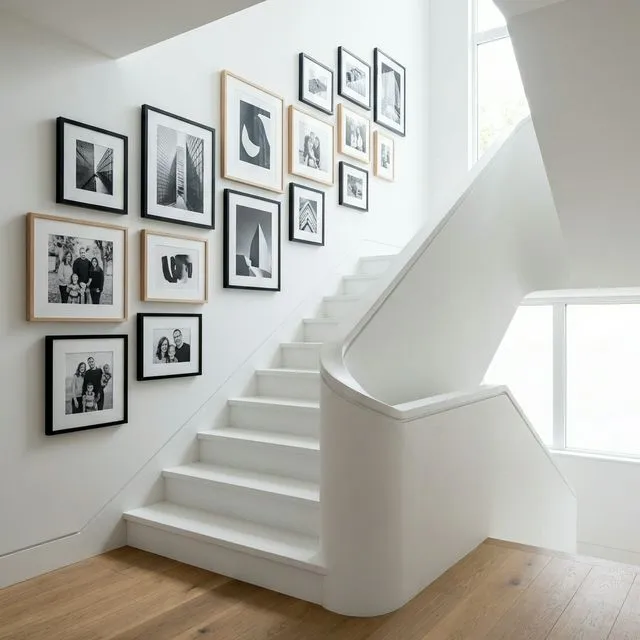
Staircase walls are the ultimate gallery wall challenge—and the most rewarding when done right. This guide covers the geometry, safety rules, and GalleryPlanner features that make diagonal layouts achievable.
Why Staircases Are Tricky
| Challenge | Why It Matters |
|---|---|
| Diagonal slope | Frames must follow the stair angle for visual harmony |
| Variable viewing height | You see frames from above and below as you climb |
| Safety clearance | Frames too low = bumping heads and elbows |
| Mixed sightlines | Different frames visible from different positions |
The Essential Measurements
Before opening GalleryPlanner, measure these three things:
| Measurement | What to Measure | Why It Matters |
|---|---|---|
| Wall width | Horizontal distance along the staircase | Determines how many frames fit |
| Wall height | Vertical from stair nosing to ceiling (measure at multiple points) | Varies along the slope |
| Stair angle | Rise ÷ Run × 57.3 = degrees | Sets your layout diagonal |
Calculating Your Stair Angle
Most stairs have a 30-40 degree angle. Here’s how to calculate yours:
- Measure the rise: Height of one step (typically 7-8 inches)
- Measure the run: Depth of one step (typically 10-11 inches)
- Calculate: Rise ÷ Run = slope ratio
| Rise | Run | Ratio | Approximate Angle |
|---|---|---|---|
| 7” | 11” | 0.64 | 32° |
| 7” | 10” | 0.70 | 35° |
| 8” | 10” | 0.80 | 39° |
| 8” | 9” | 0.89 | 42° |
The Centerline Rule
The centerline of your gallery wall should run parallel to the handrail at a consistent height.
| Handrail Height | Recommended Centerline |
|---|---|
| 34” (standard) | 48-52” above stair nosing |
| 36” (tall) | 50-54” above stair nosing |
| 42” (code max) | 52-56” above stair nosing |
Pro tip: The centerline isn’t where frames sit—it’s the imaginary line running through the middle of your entire gallery arrangement.
Safety Clearance Requirements
Keep frames at a safe distance from the stairs to prevent bumps and damage.
| Zone | Minimum Clearance | Reason |
|---|---|---|
| Above stair nosing | 4-6” | Avoid elbow bumps while using handrail |
| Head clearance | 6’8” minimum | Building code requirement |
| From handrail | 2-3” | Room for hands + visual breathing space |
Using GalleryPlanner’s Staircase Mode
GalleryPlanner has a dedicated Staircase Mode that handles the geometric complexity for you.
How to Enable
- Open Wall Properties
- Select Staircase (Ascending or Descending) instead of Flat
- Enter your wall dimensions
- Set the Rise (%) to match your measured slope
What Staircase Mode Does
| Feature | Benefit |
|---|---|
| Angled canvas | Shows your actual wall shape |
| Slope-aware Auto-Layouts | All layout strategies respect the usable staircase shape |
| Clearance zones | Highlights areas to avoid |
| Angle guides | Alignment lines follow the stair slope |
Auto-Layout on Staircase Walls
All five Auto-Layout strategies—Masonry, Structured, Skyline, Organic, and Center Out—fully respect the staircase shape. The algorithms automatically work within the sloped usable area, so generated layouts climb the wall properly rather than bleeding into the angled margins.
To use it:
- Enable Staircase Mode and enter your wall dimensions and stair angle
- Open Auto-Layout and pick any strategy
- Click “Auto-Arrange”—the layout will fit the staircase silhouette
- Don’t love it? Click “Generate” again for a different arrangement in the same style
The sidebar preview thumbnails also mirror the staircase silhouette, so you can judge how each style fills your specific slope before applying it.
Pro tip: Masonry tends to produce the most natural-looking staircase fills and handles dense, maximalist layouts well. Skyline is a good choice for cleaner, more structured arrangements. Organic (Scatter) works better for sparse layouts—it won’t pack frames as tightly and can struggle with large inventories.
Recommended Layouts for Staircases
| Layout Style | Best For | Frame Count |
|---|---|---|
| Diagonal Line | Minimalist, few frames | 3-5 frames |
| Staggered Cascade | Mixed sizes, organic feel | 5-9 frames |
| Salon Slope | Maximalist, floor-to-ceiling | 10+ frames |
| Stepped Grid | Uniform frames, modern look | 6-12 frames |
The Diagonal Line
Arrange frames in a single line parallel to the stair slope. Works best with matching or similar-sized frames.
See one with sizes: The Staircase Gallery Wall Layout is a five-frame diagonal line, with frame sizes, overall dimensions, and install notes.
The Staggered Cascade
Frames “step down” following the stairs but with organic spacing—like a waterfall of frames.
The Salon Slope
Dense coverage from handrail to ceiling, with the slope running through the center of the arrangement.
Common Staircase Mistakes
| ❌ Mistake | ✅ Fix |
|---|---|
| Frames too high at top | Start layout from the middle, work both directions |
| Ignoring the slope | Every frame centerpoint should sit on the diagonal |
| Too close to handrail | Maintain 2-3” clearance minimum |
| Mixed angles | All frames should be level (0°), not tilted to match stairs |
Step-by-Step Process
- Measure your wall width, height at multiple points, and stair angle
- Enable Staircase Mode in GalleryPlanner
- Build your frame library with your actual inventory
- Use Auto-Layout to generate slope-aware arrangements—all strategies work on staircase walls
- Adjust manually for safety clearances
- Export your PDF guide (Pro Only) with exact nail positions
- Hang from the middle and work outward in both directions
Ready to Generate a Layout?
Open GalleryPlanner with Auto-Layout ready and turn these ideas into a wall plan with real dimensions.
Launch GalleryPlanner